

How to Register Business Name with DTI: An Ultimate Guide
Table of contents
- What is a business name according to DTI?
- Why do you need to register your business name with DTI?
- What are the requirements needed to register your business name with DTI?
- Who can apply for DTI business registration?
- How to apply for a DTI business name registration?
- Frequently asked questions about business name registration with DTI
- How to renew a business name with DTI?
What is a business name according to DTI?
Business name is a unique identifier that makes your sole proprietorship differ from other similar businesses. According to the Department of Trade and Industry, your business name is the name given to your enterprise which will be used in any transaction connected to it. So when you register a business name, it will become the face of your business and will appear on all written and printed receipts. It will also be placed on other pieces of evidence related to your business transactions. The registered name will become a part of your operation and announce your business presence to the world. This is why DTI encourages all Filipino entrepreneurs to acquire a DTI Certificate of Registration (COR) for their businesses as soon as possible.Dominant Name and Business Name Descriptor
Before we discuss how to register a business name for your company, you should first know what the name should have. As per DTI, there must be two portions for your business name:- Dominant name: The main portion of the name usually comprises a word, phrase, or a combo of letters and numbers.
- Business name descriptor: The secondary portion describes the nature of the business and serves as the modifier of the dominant. Basically, it’s there to give consumers an idea of the product or service you deal in.
Why do you need to register your business name with DTI?
When you register your business name with the DTI, your business name becomes unique and yours only to claim. You may not be able to imagine right away how a duly registered name can powerfully impact your business dream. Let me enlighten you on this:- First, it is a legal requirement in the Philippines, so you can’t ignore it. As per the Business Name Law, it is illegal for you to use any business name other than your own unless you register it with the DTI.
- Another reason for registering your business name is to prevent other entities from using the same name as yours. Once the name is secured through DTI, you will gain exclusive rights to use it within its validity of five years. After that, you have to renew it.
What are the requirements needed to register your business name with DTI?
All applicants who are not applying online must submit two hard copies of the Business Name Registration Form. These copies should be submitted with any valid ID from the following list:- Passport
- UMID
- Driver’s license
- PRC ID
- Police Clearance (in ID form)
- NBI Clearance
- Postal ID
- OWWA ID
- Voter’s ID
- Seaman’s Book
- Senior citizen ID
- IBP ID
- PWD ID
- Government office ID
- Validated state college ID
- Foreign nationals: Certificate of Authority to Engage in Business in the Philippines
- For refugees and stateless people: A certificate of Recognition
Who can apply for DTI business registration?
Generally, any business owner who is at least eighteen years old can apply for a DTI name. Even foreign nationals and refugees can apply for it, but they must present a Certificate of Authority to Engage in Business in the Philippines. So the key points are:- Applicants should be at least eighteen years old.
- Foreign nationals and refugees should have the Certificate of Authority to Engage in Business
How to apply for a DTI business name registration?
Thanks to the BNRS (Business Name Registration) Next Gen, it’s now extremely easy for sole proprietors to register a business name. Moreover, due to this newly launched portal, you can submit your business name application along with its fees online. Furthermore, you can even get the Certificate of Business Name Registration without leaving your homes by printing it yourself. This online portal has eliminated the bureaucratic red tape and encourages Filipino entrepreneurs to register. This is why in 2020 alone, more than 88,000 online businesses registered with the DTI due to flexible online registration. So what are you waiting for? Below are the steps to register your business name online from anywhere around the world. The only thing you require is an internet connection.Step 1: Open the DTI website and fill the form
You no longer need to visit the DTI office in person to gain a Certificate of Business Name Registration. Instead, just visit the Business Name Registration System (BNRS) website. You will find the terms and conditions there right away.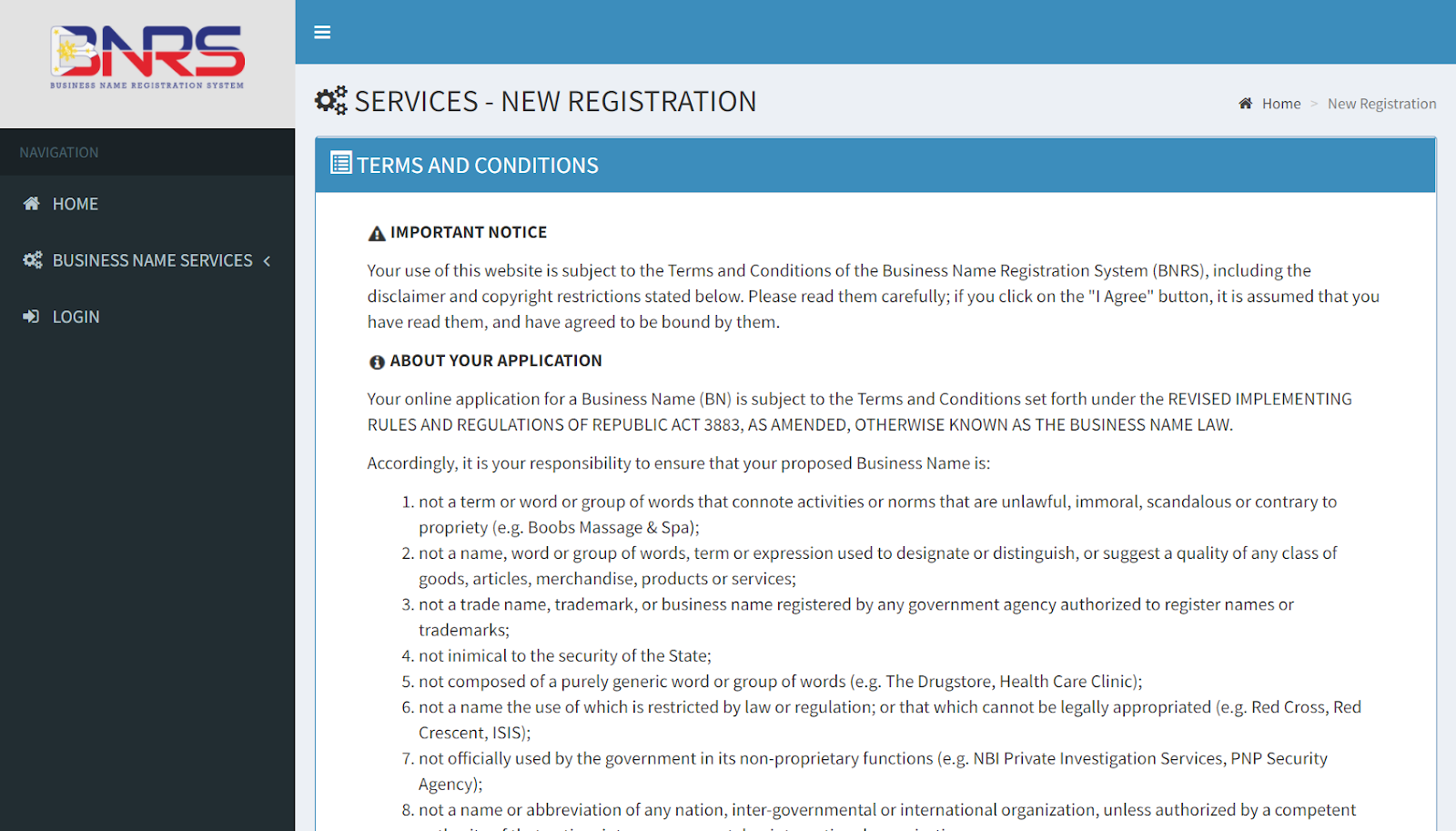 Simply go through them and click on the “I Agree” button below the page.
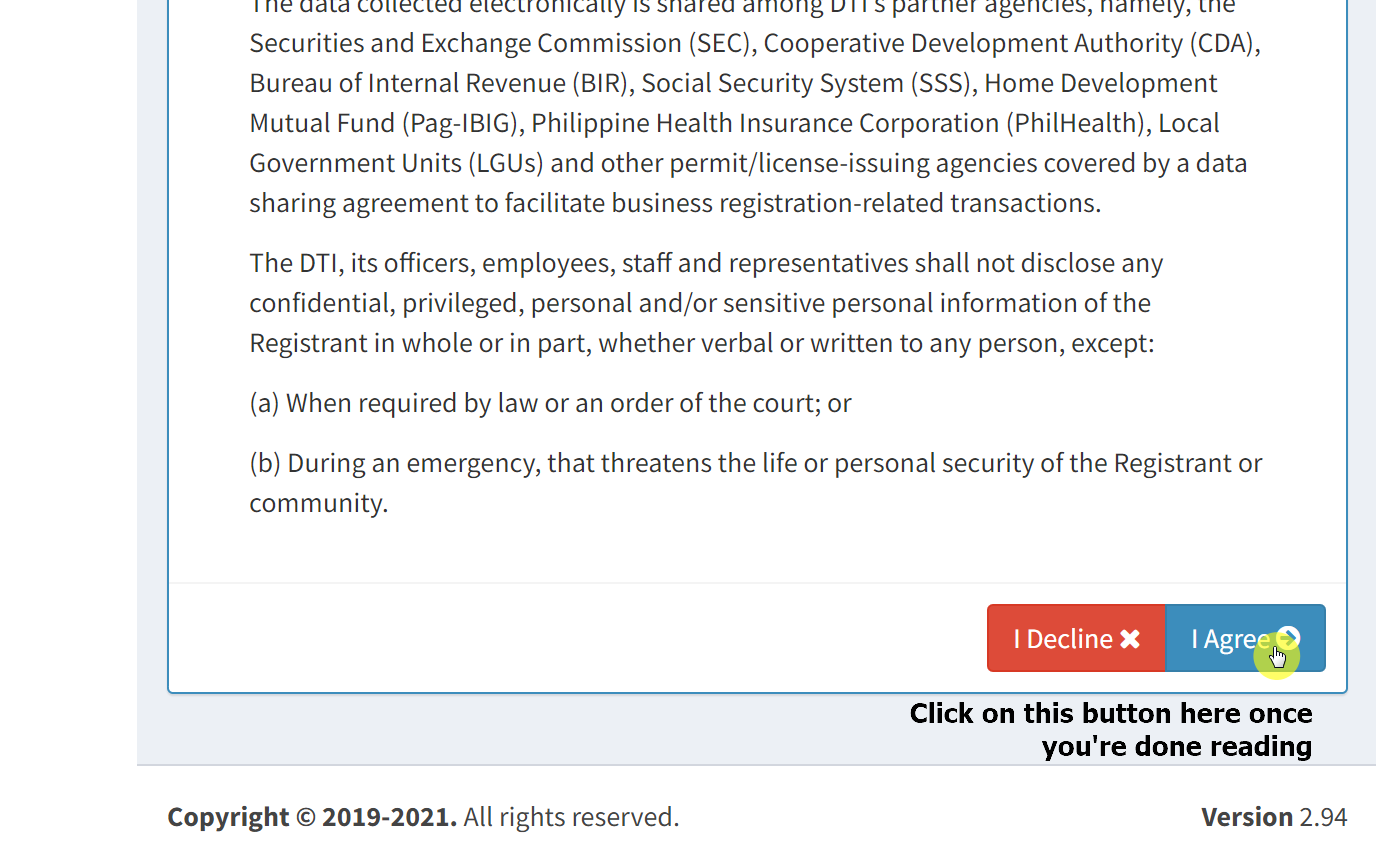
Step 2: Owner’s Information
Then, fill out the owner’s information form provided on the next page. Don't miss any fields marked with a red asterisk. Click on the “Next” button below the form after filling out all the necessary fields.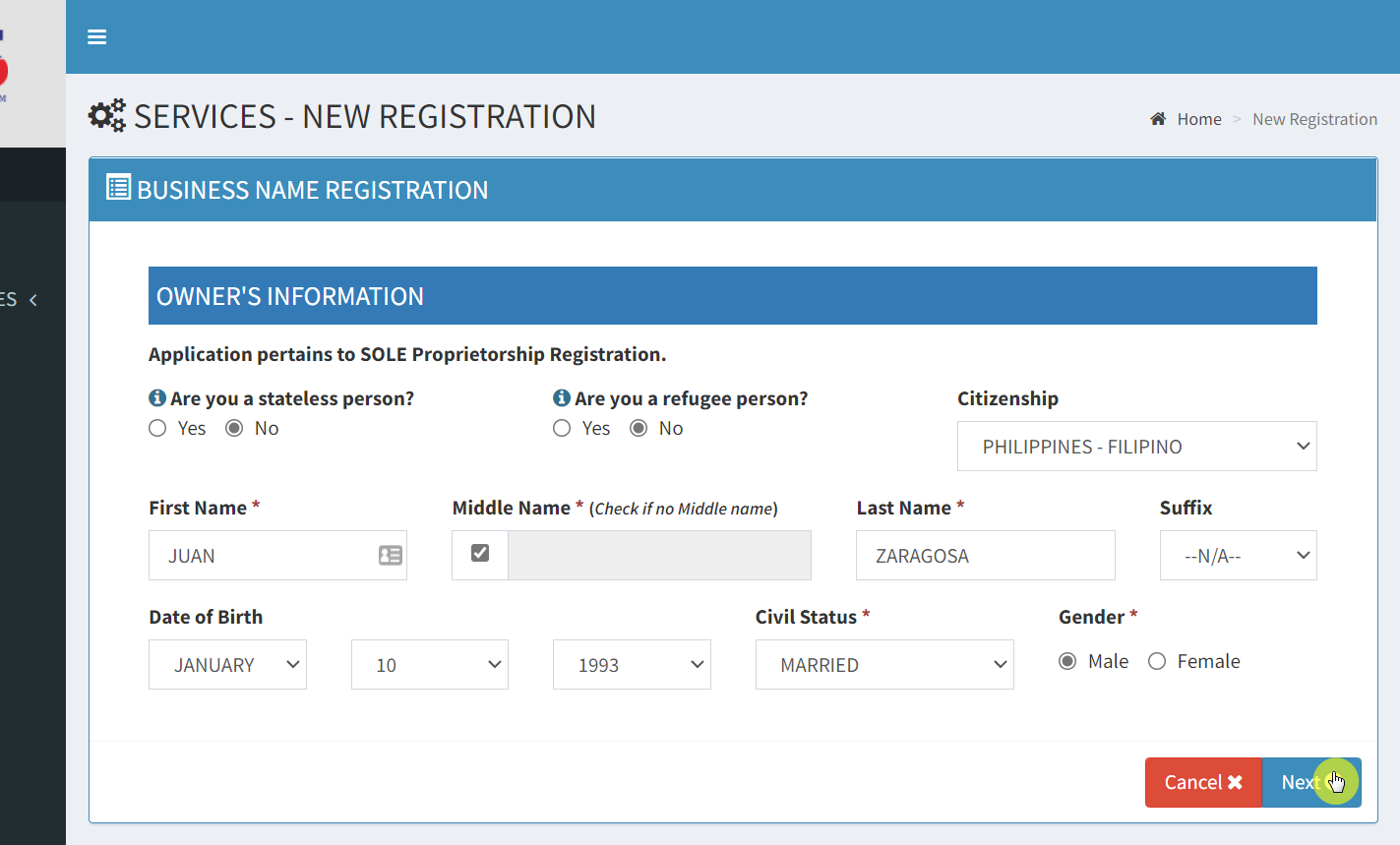 A window will then pop up where you can review the details you entered. If everything is right, simply click on the “Proceed” button to continue.
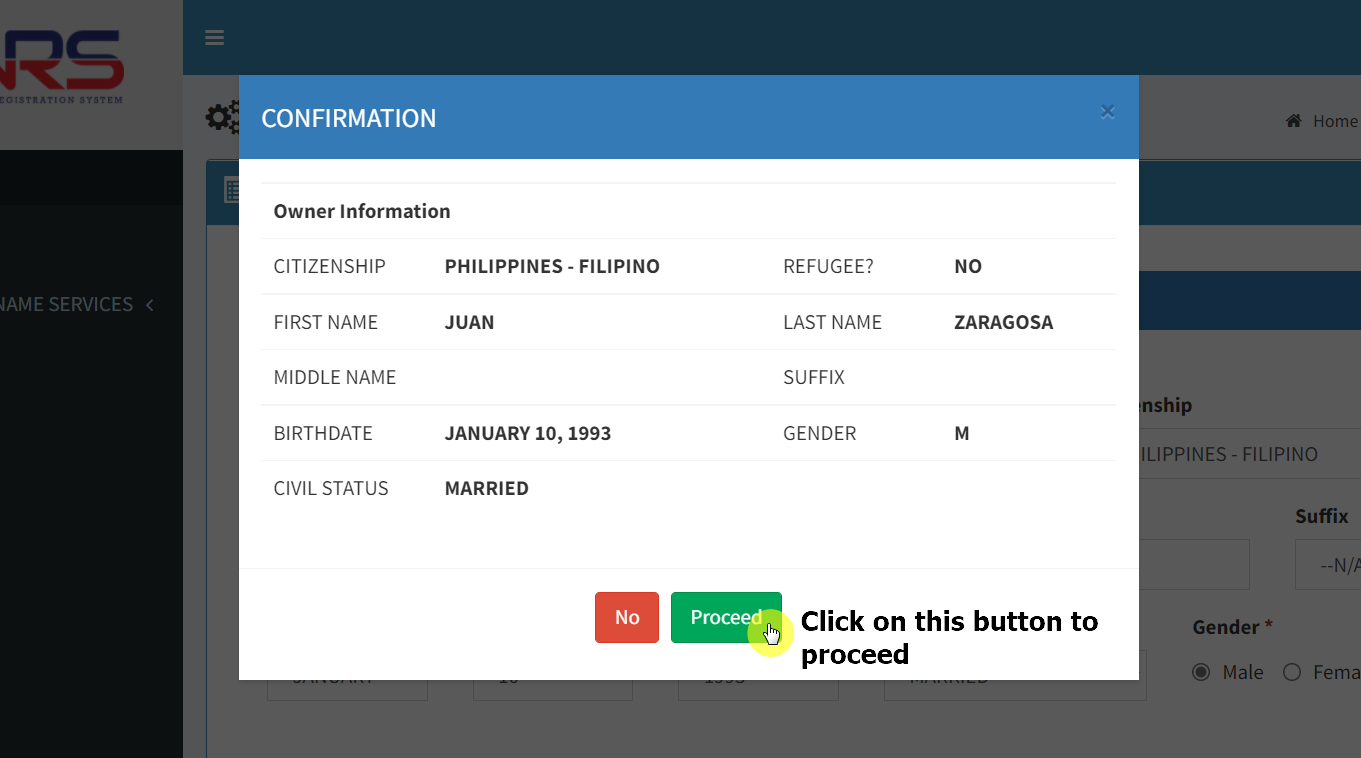 You will be asked to Identify the business scope.
Step 3: Business Scope
This simply refers to the location where you can operate. You can choose ‘National,’ which will allow you to expand anywhere in the Philippines. However, if you plan to remain home-based and have no plans for expansion, then pick ‘Barangay’ as it’s cheaper.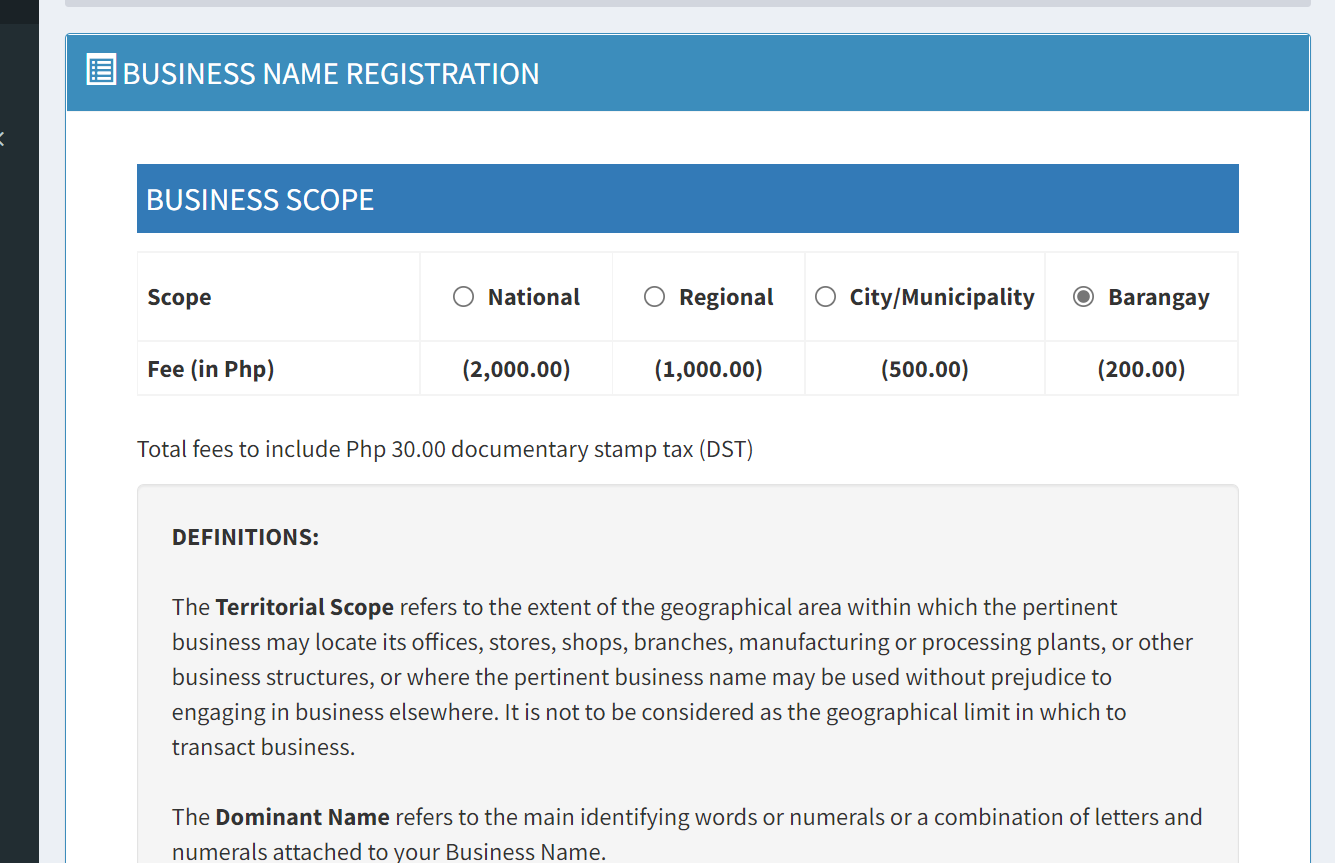 The fields below will then expand where you can to select your region, province, and barangay. Then you will have to select a “Dominant Name” and a “Business Name Descriptor”.
Place the unique name you think is well suited for your entity here. For the business name descriptor, you can click on the “Advance Search” button to see which descriptor is the most fit for your business.
The fields below will then expand where you can to select your region, province, and barangay. Then you will have to select a “Dominant Name” and a “Business Name Descriptor”.
Place the unique name you think is well suited for your entity here. For the business name descriptor, you can click on the “Advance Search” button to see which descriptor is the most fit for your business.
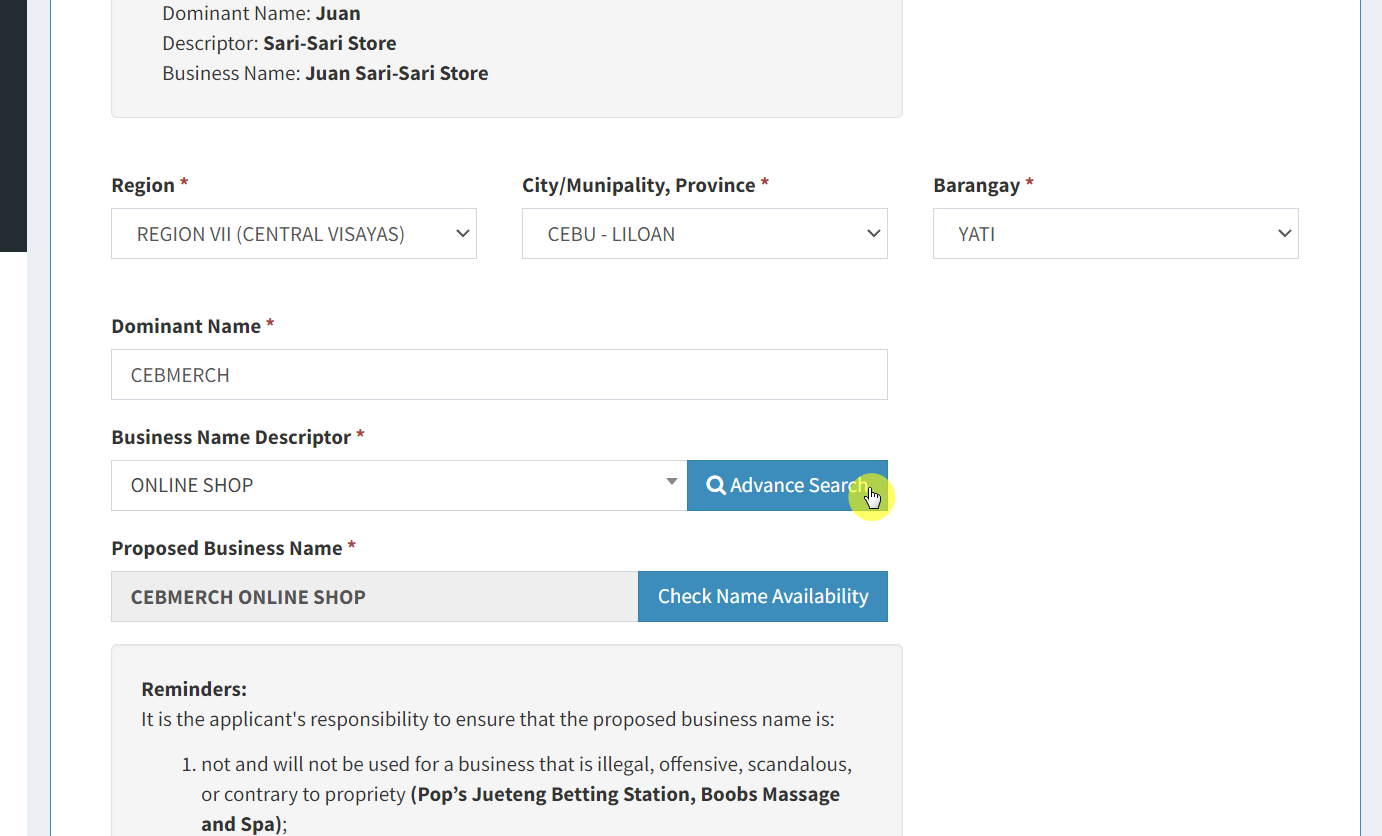 This will open a window that would help you hone in on a descriptor for your business using the standard industrial classification in the country. All you need to do is open the dropdown and select from the ones that best fit your business.
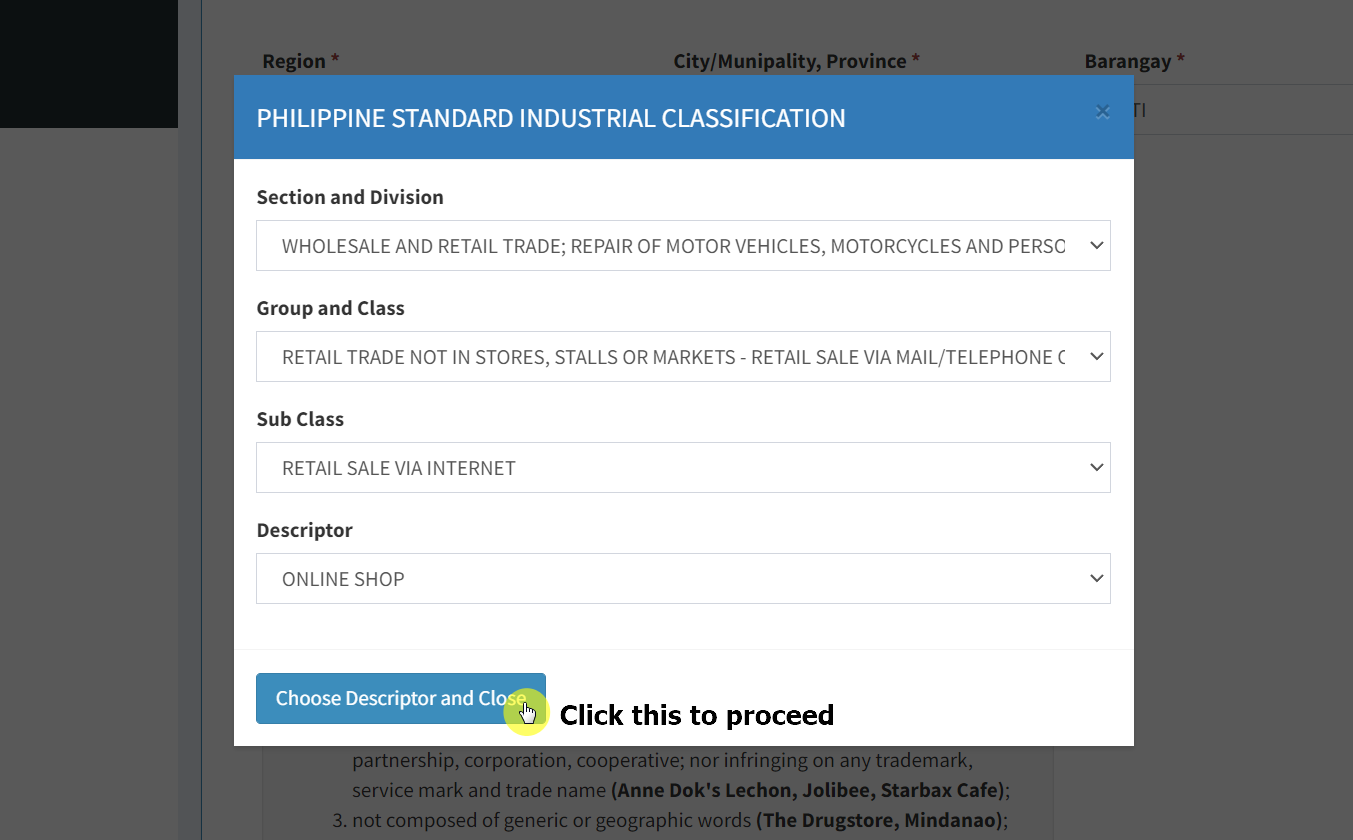
Step 4: Business Name Availability
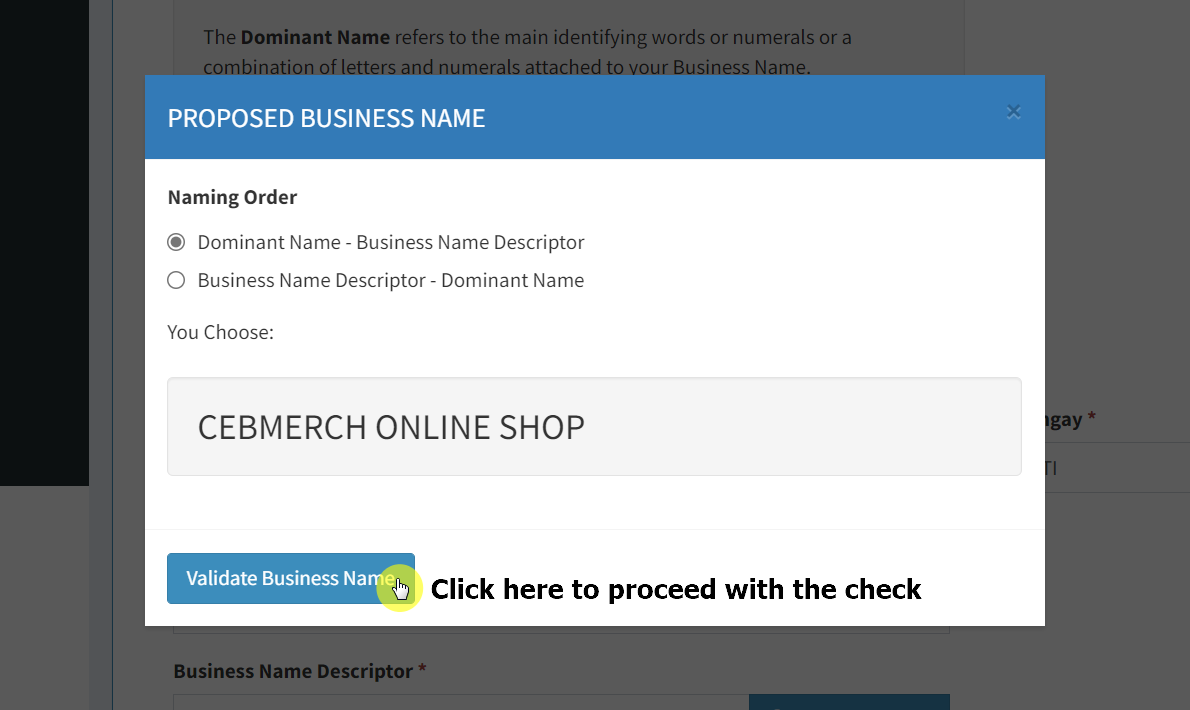
Now, it’s time to check the availability of your business name. When you get back to the previous page, simply click on the “Check Name Availability” button.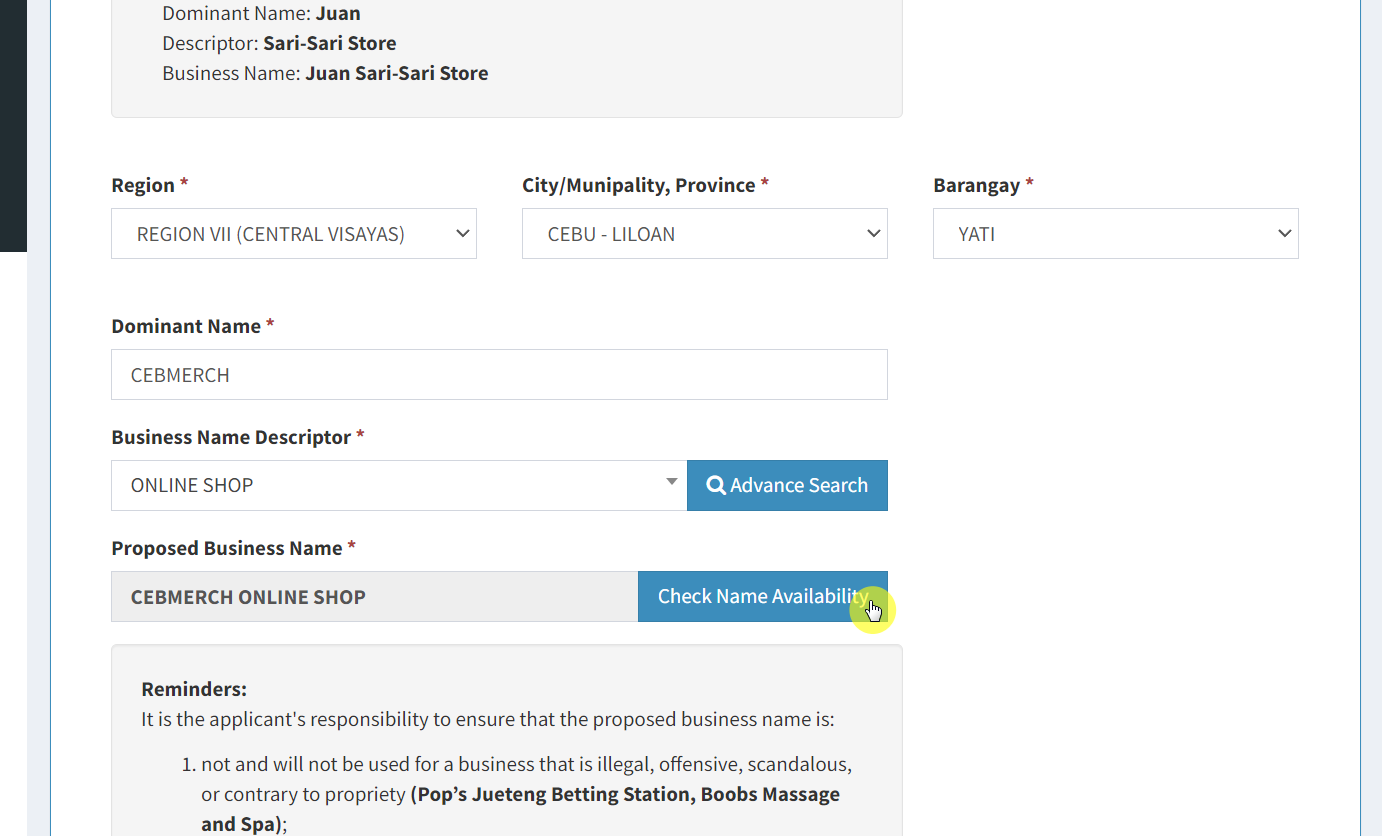 A window will open where you can select the naming order. To proceed with checking the name availability, click on the “Validate Business Name” button.
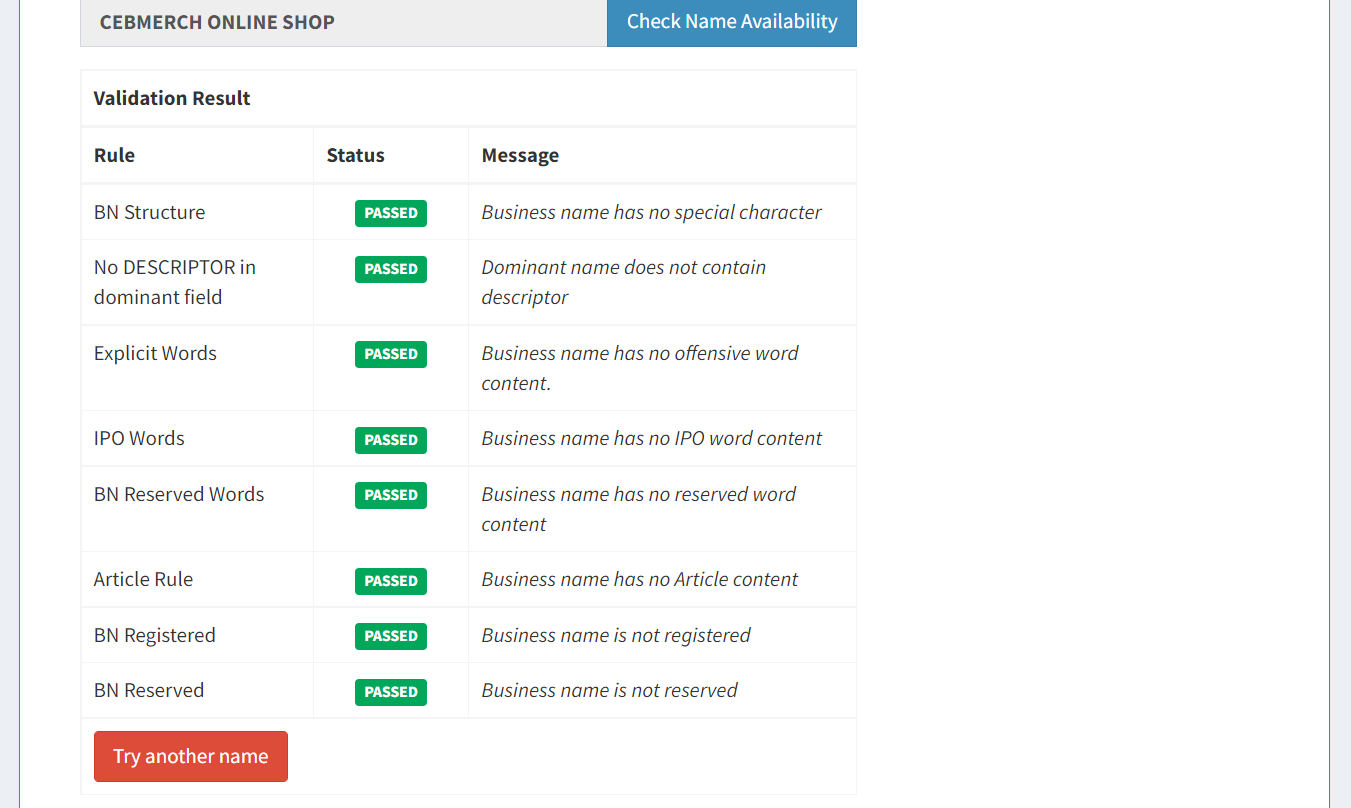
 If your name is valid and available, you will see “Passed” on all the status on all rules. Once you’re ready to proceed, click on the “Next” button found below the page.
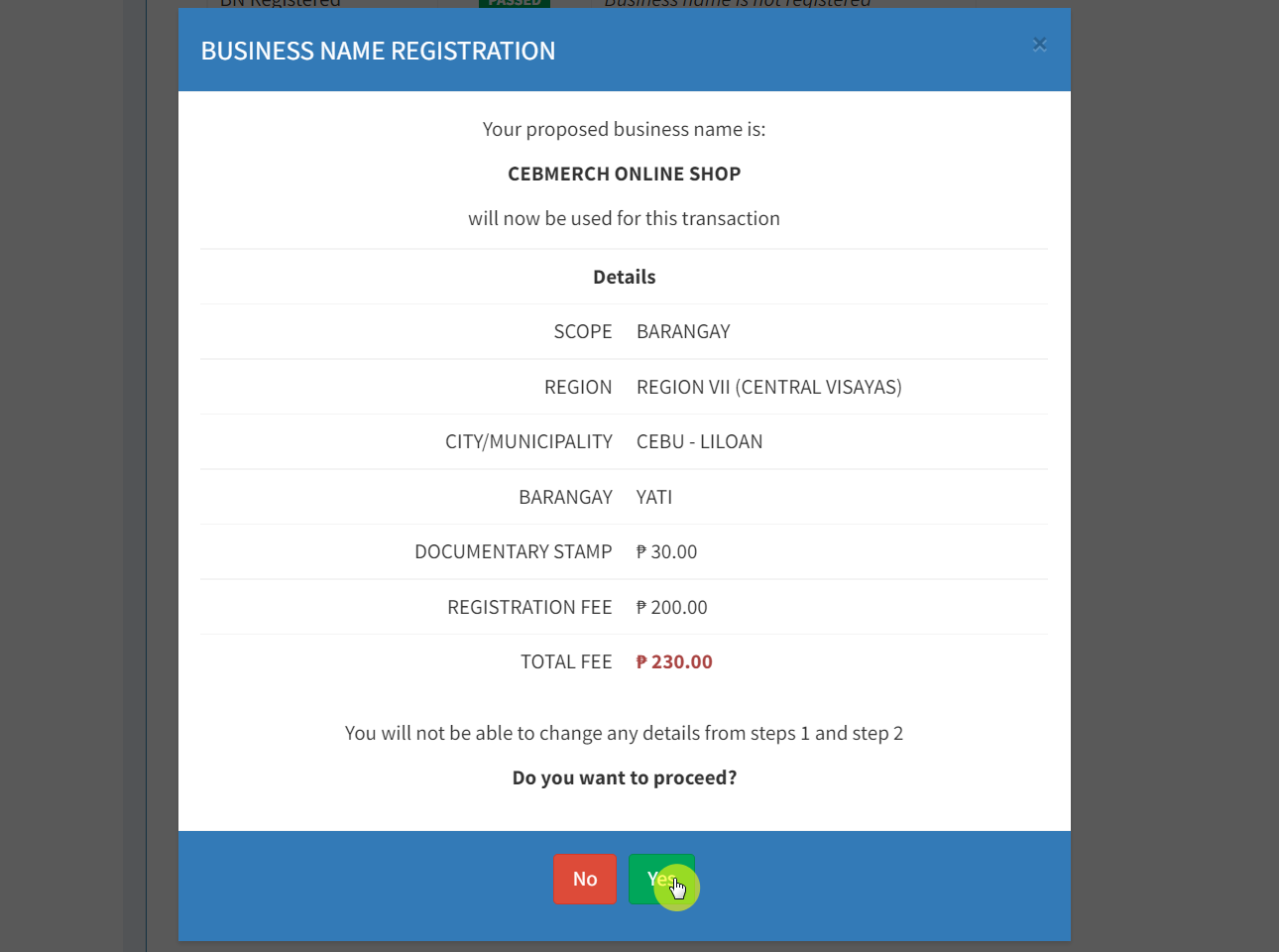
 Once you click on the “Next” button, you will be asked to confirm the details along with the total fee you need to pay for your business name registration.
Click on the “Yes” button below the window to proceed.
Once you click on the “Next” button, you will be asked to confirm the details along with the total fee you need to pay for your business name registration.
Click on the “Yes” button below the window to proceed.
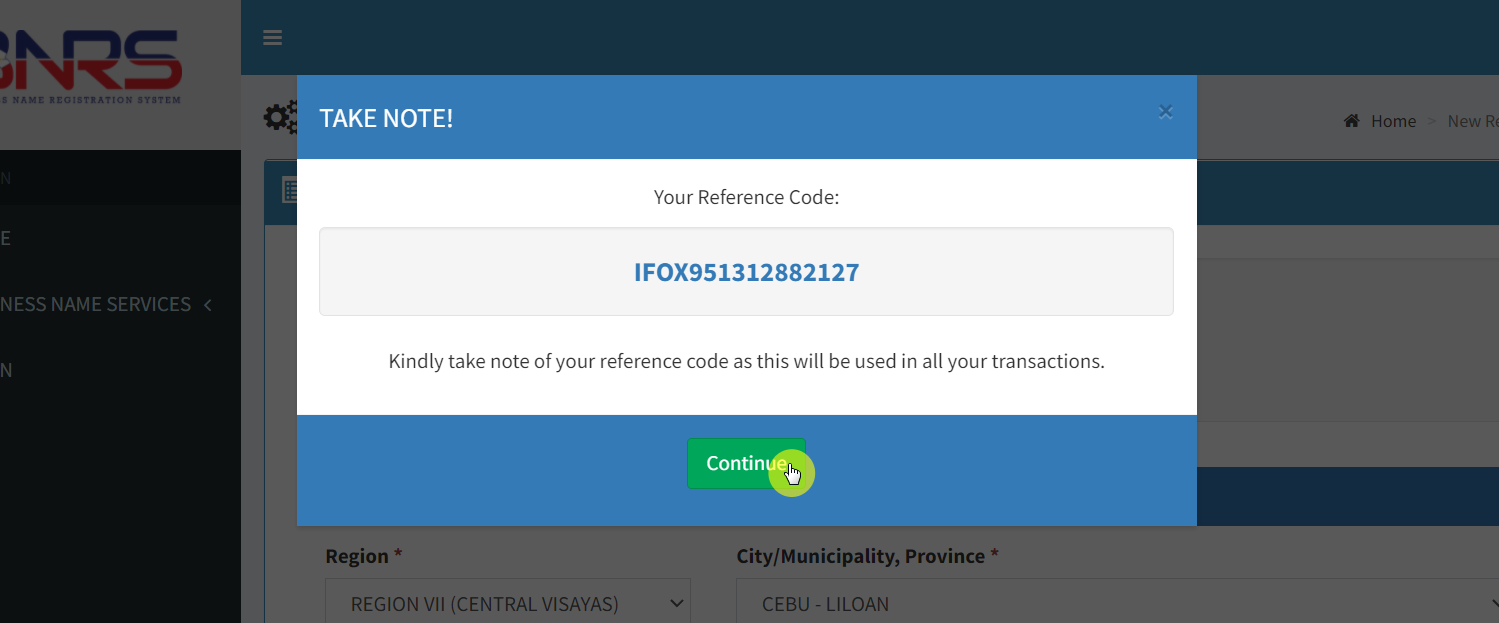
 The system will then show you the reference code. Kindly take note of it as you might need it on future transactions.
Press “Continue” to proceed.
The system will then show you the reference code. Kindly take note of it as you might need it on future transactions.
Press “Continue” to proceed.
Step 5: Other Information
Lastly, you will be prompted to fill in your additional business details, personal information, and other details.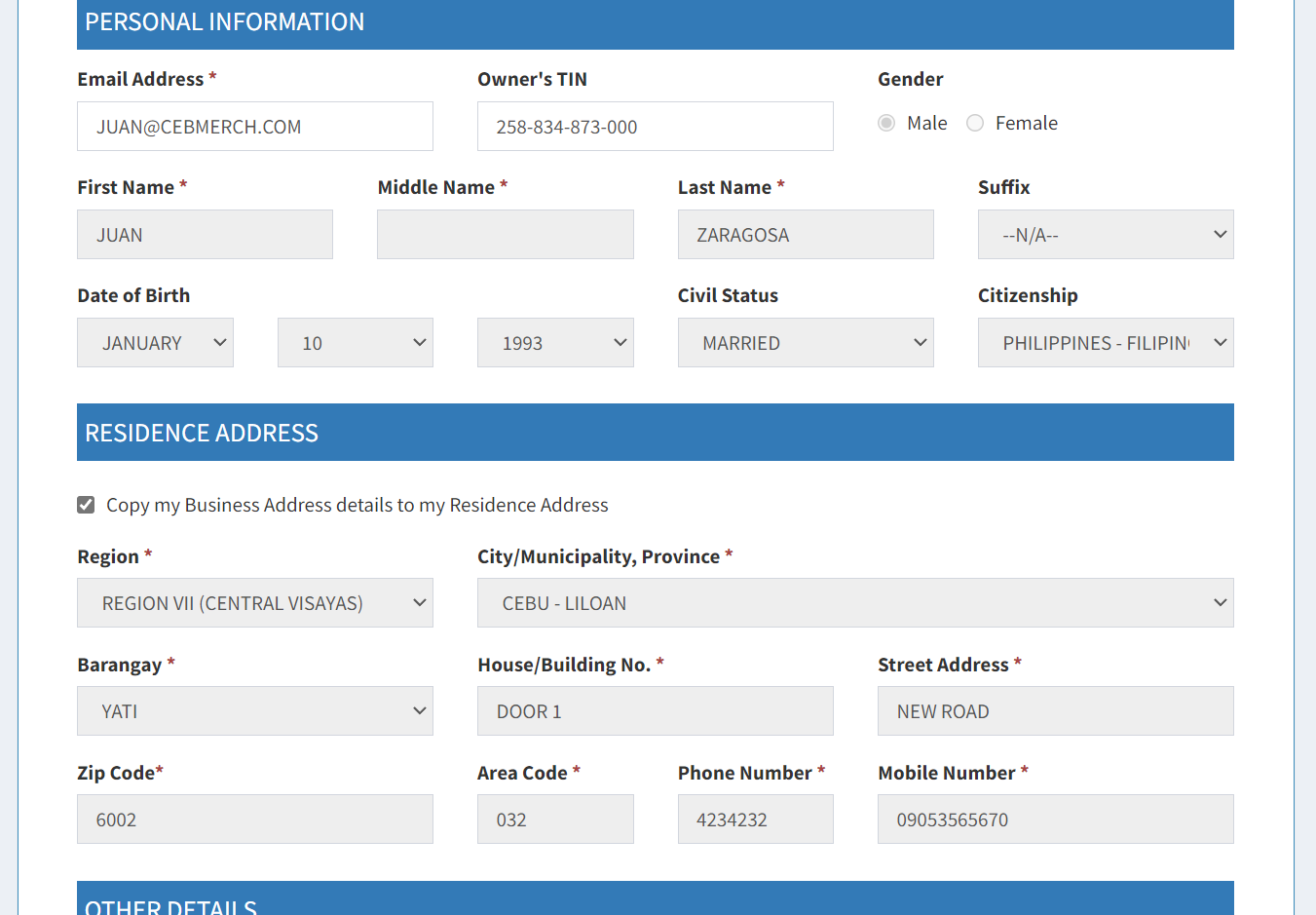 Now, type in your asset values, i.e., all properties owned by your business. Then, type your capitalization, i.e., the amount of cash you have invested in your company. There are also fields for the number of employees, separated by gender.
Note that you can also skip this step, especially when you haven’t actually started your business yet. After reviewing all details and ensuring there aren’t any typos, simply click on the “Next” button to proceed.
Now, type in your asset values, i.e., all properties owned by your business. Then, type your capitalization, i.e., the amount of cash you have invested in your company. There are also fields for the number of employees, separated by gender.
Note that you can also skip this step, especially when you haven’t actually started your business yet. After reviewing all details and ensuring there aren’t any typos, simply click on the “Next” button to proceed.
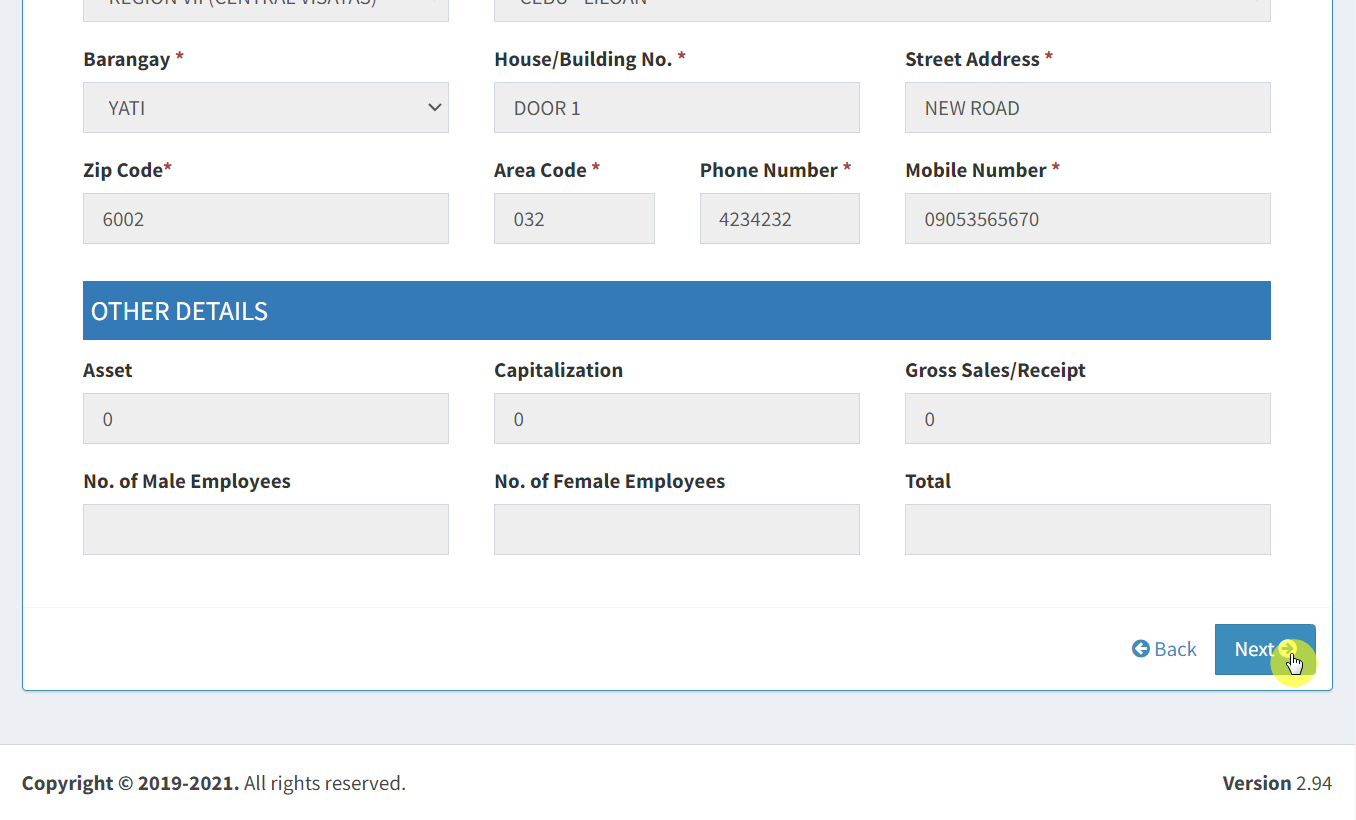
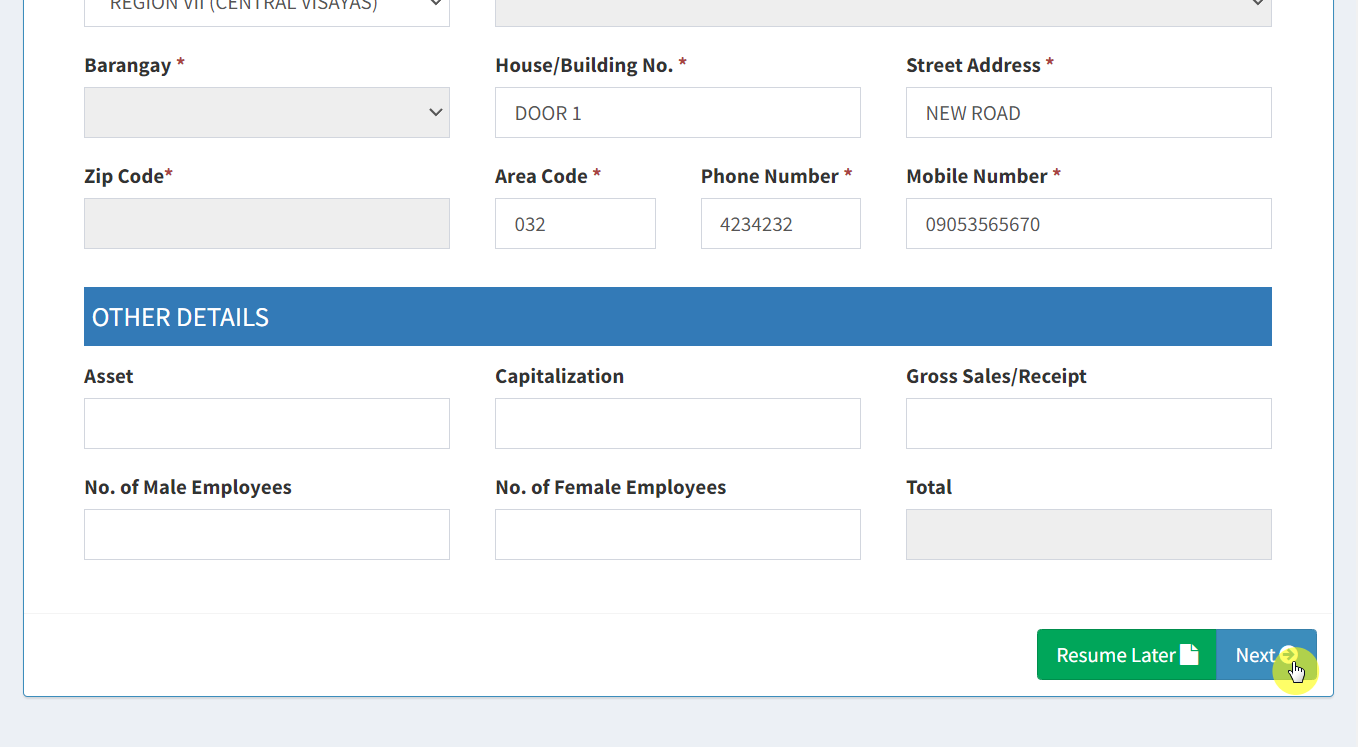 Recheck all the information you entered. Once you’re done, click on the “Next” button again at the bottom of the page.
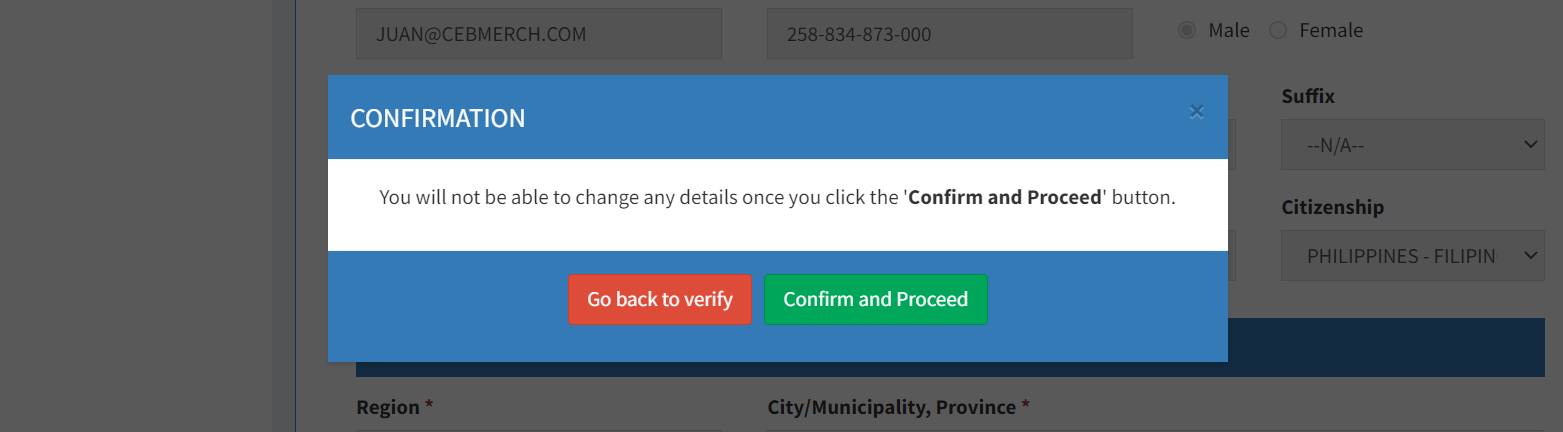
 On the next window, click on the “Confirm and Proceed” button.
Step 5: Payment
On the next page, you will be able to read the undertaking information. Make sure to read all of it. After that, there is a “Proceed” button at the bottom of the page you can click that also serves as your sign of agreement and consent.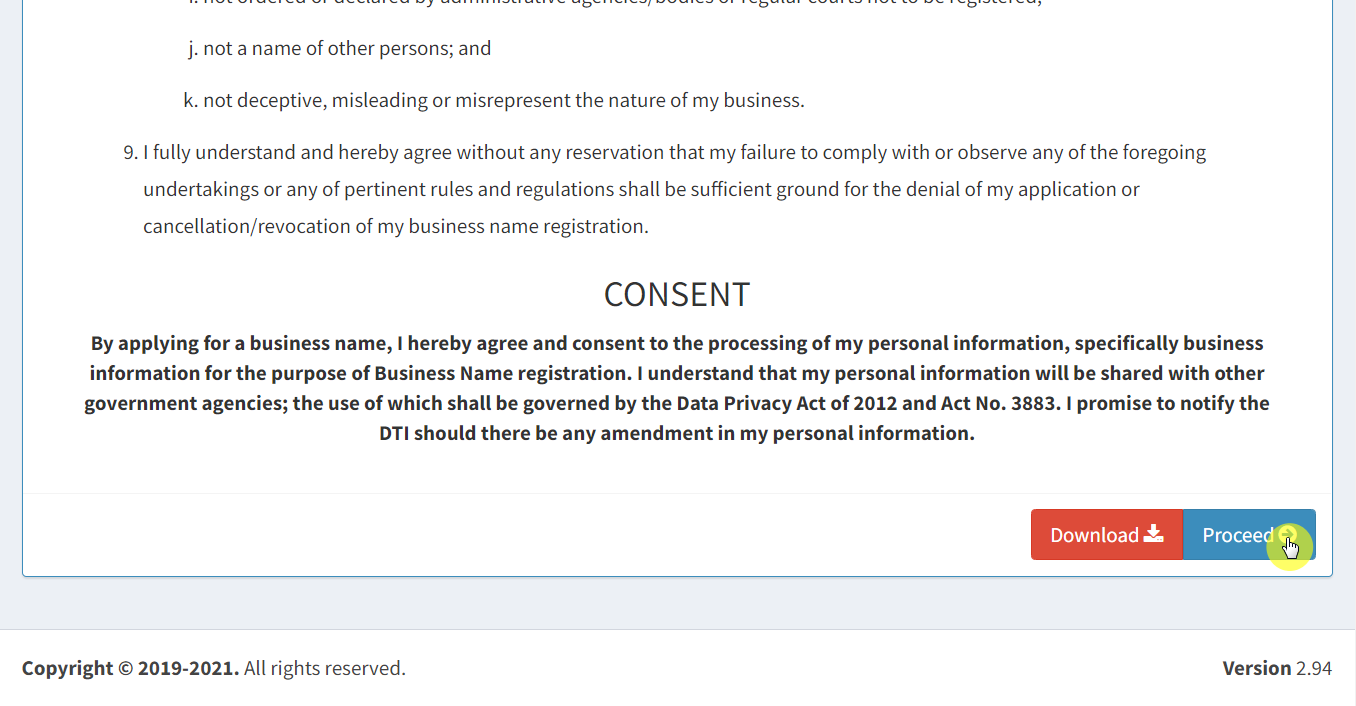 On the next page, you will be able to check the payment details as well as all the payment options available and the transaction fees for each option.
Select the payment method you want to use and click on the “Proceed Payment” button.
On the next page, you will be able to check the payment details as well as all the payment options available and the transaction fees for each option.
Select the payment method you want to use and click on the “Proceed Payment” button.
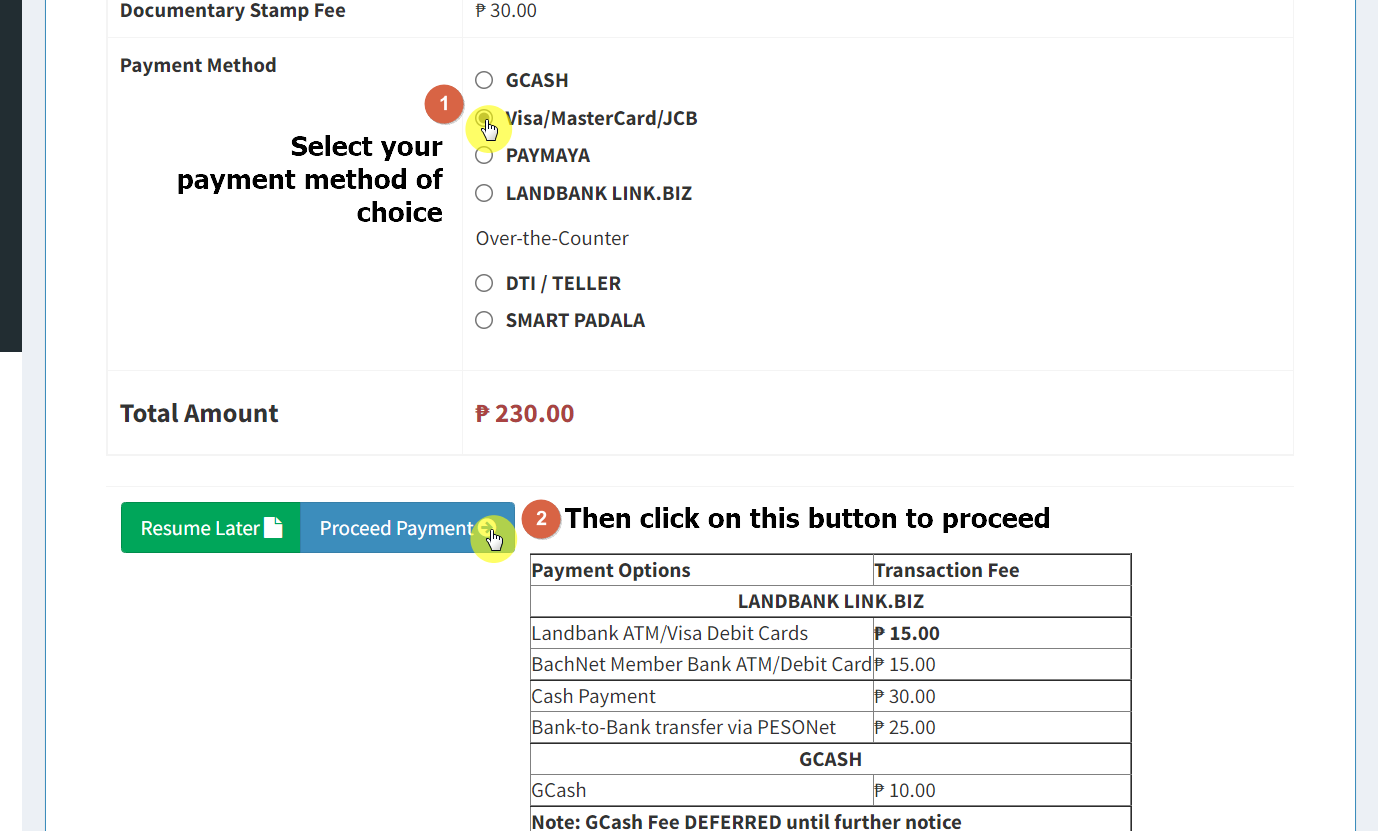 The next page you see usually depends on the payment method you chose. For example, after choosing the Visa/MasterCard/JCB option, you will see the page below.
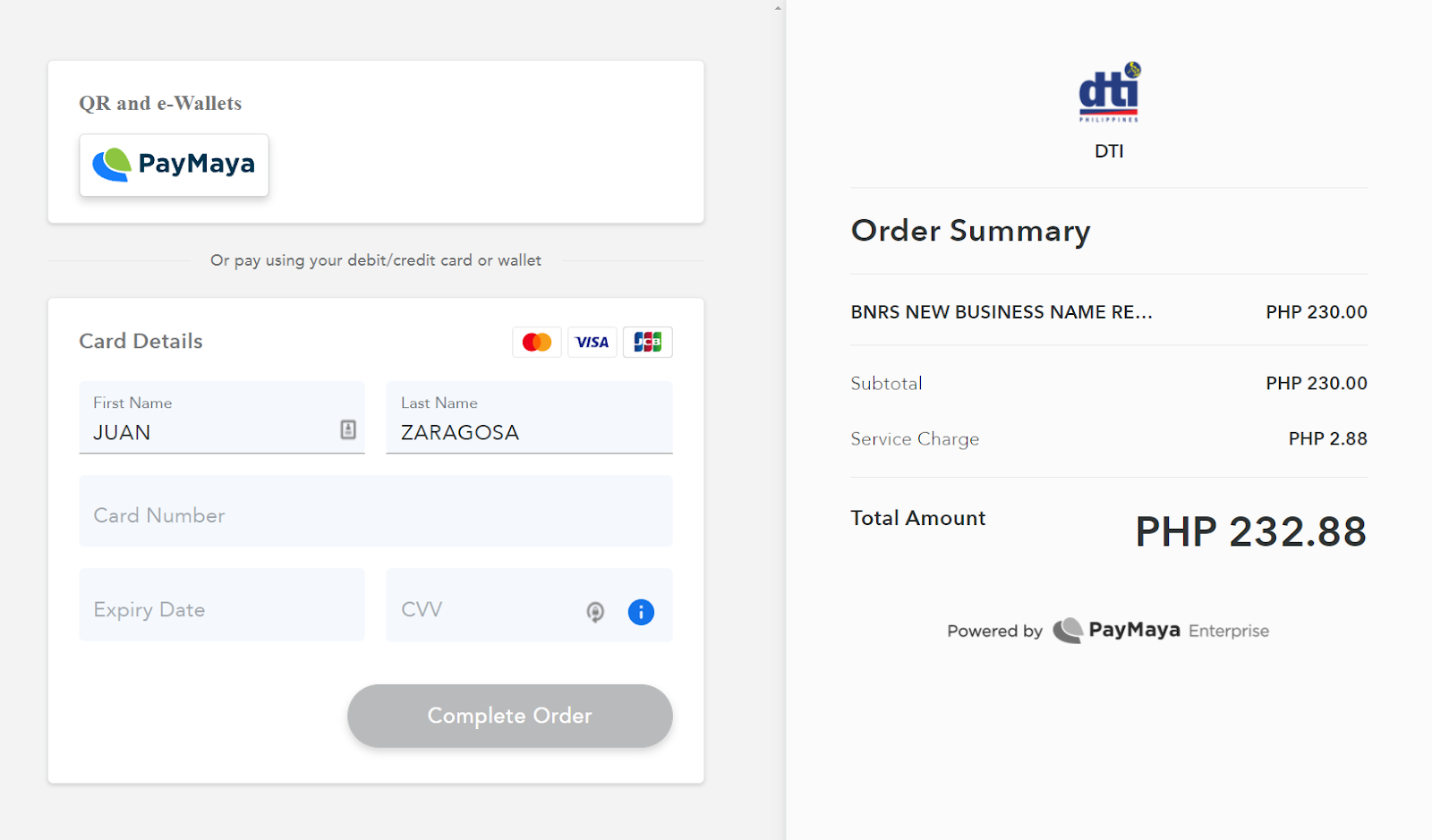 Now, all you have to do is pay the fee, and the certificate will be emailed to you.
On-site Business Name Registration
If you don’t want to complete the application online, you can do it the old-fashioned way by visiting the DTI office. Here are the steps to file your business registration name via the walk-in application system:- Visit any DTI office or Negosyo Center near you. There are numerous offices all across the Philippines.
- Submit the business registration documents required. Ensure that you have backups available in case your proposed business name is already taken.
- Pay the fee on the spot.
- Once The DTI approves the business name, it will issue you a Certificate of Business Name Registration.
Frequently asked questions about business name registration with DTI
Here are answers to some questions you might be asking:How much does it cost to register my business name with DTI?
The fee for registering a business name is quite less. This is to promote more Filipino businesses to register themselves. The fee differs according to the business’s territorial scope — the larger the scope, the greater the fee:- Barangay: ₱200
- City/Municipality: ₱500
- Regional: ₱1,000
- National: ₱2,000
What are the guidelines in choosing a business name?
To make the process of choosing a name smooth and fast, DTI has issued some guidelines you should go through. Your business name:- Must describe what your business does
- Should have words, numbers, and punctuation marks which can be in both English or Filipino language
- Must not be similar to already existing brands and trademarks such as Starbux
- Shouldn't be too generic like ‘The Cloth Store”
- Shouldn’t have abbreviations that represent international organizations or government agencies
- Shouldn’t mention illegal or offensive products and services like Mark Betting Place, Boobs Spa, etc.
- Shouldn't suggest the quality of the product or service provided, like Best Car Factory or A-1 Shoe Shop
- Shouldn't misrepresent or mislead the nature of the business
- Shouldn’t be officially restricted by law or other government bodies
- Shouldn't be damaging to the State
What is the difference between a business name and a trade name?
Often, we think that the business name is the same as the trade name. But this isn't true in all cases. Sometimes, entrepreneurs choose different names for their businesses for legal and marketing purposes. When you register a business name, it is more formal, while the trade name is usually witty and appealing. As mentioned above, the business name is a legal name that appears on all the papers and documents. Whereas the trade name is what you want the public to see, and you use it in your marketing and branding efforts. So, it is quite useful if you choose a business name that is appealing as well so you don’t need to undergo the hassle of finding a trading name for marketing.What is a trademark?
When you register a business name, that allows you to use the name, but it doesn’t guarantee riddance from free riders and copycats. Other sellers can still use your business name for their benefit. The DTI doesn’t prevent them from imitating your words or any other identifying marks which you create for your business. If you think your branding and marketing tools are prone to copying, then you should get a trademark from IPOPHIL. This ensures that your product or any identifier related to it will be exclusive for your use only.Would I be able to update my business information?
Your business name is valid for five years. In this period, many things can change. Therefore, there will be instances when you feel the need to update some information. You can do this via the BNRS website. But remember, you can only update the info if your registration hasn’t expired yet. In addition, the updating is valid for the following details only:- The business address
- Correction of Capitalization errors
- Editing line of business to a certain extent only — as long as it applies to your previously chosen name
- Altering products and services
- Modification of the name of the registrant can only occur if it is supported by an original copy of the judicial decree or marriage certificate
- Letter of request for an additional line of business
- Photocopy of the business name certificate
How to renew a business name with DTI?
Your registered business name expires after every five years. So, to retain it, you need renewal from DTI. Here are the steps to do that:- On the DTI website under Business Name Services, click on “Renewal.” Then, after reading the terms and conditions, click “I Agree”.
- Type your transaction reference number and find your current name in the search results.
- After clicking it, you will reach the transaction summary page.
- Wait for the confirmation pop-up and select “Renew Only” if you don't want to update anything.
- Review the details and press “Next”. You will see a pop-up with your new reference code.
- Click on “Proceed,” and then you can choose the payment method applicable.
- Once the payment is successful, you will get a renewal for five years.