
Example :
How to set up an email or change my account settings.
- Help Center
- Unlimited Email Hosting
- Getting Started
- How to Add a DKIM Record When It Exceeds the 255-Character TXT Limit
How to Add a DKIM Record When It Exceeds the 255-Character TXT Limit
A DNS TXT record string can only hold 255 characters, but modern DKIM public keys, which use larger sizes for stronger security, are often longer than that. In this guide, you’ll learn why that happens and how to add without breaking a long DKIM TXT record value.
Table of contents
Step-by-step: splitting and adding your DKIM value
Please follow the guide below for instructions.
1. Copy the full DKIM value
Get the complete string from your email provider (Z.com, Google Workspace, Zoho Mail, Microsoft 365, etc.).
It will look like v=DKIM1; k=rsa; p=MIIBIjANBg... one long, unbroken line.
2. Split the DKIM into 255-character (or fewer) chunks
Cut the string at the 255-character mark, then continue with the remainder as a second chunk (and a third, if the key is long enough if necessary. 2048-bit keys usually need exactly two chunks). Don’t split mid-tag if you can help it; splitting in the middle of the base64 p= value itself is fine, since it gets reassembled anyway.
3. Below is a full DKIM record and how it was split into quoted chunks.
| Before splitting (Full DKIM TXT value) | v=DKIM1; k=rsa; p=MIIBIjANBgkqhkiG9w0BAQEFAAOCAQ8AMIIBCgKCAQEAocdqyUqWi5ykndtlh2Ka6cZlH3eLEnU6w6iCEgdXeyljZ2g61PBIjcm/bFe+O/2iIVAv3MyuslwrBI8Ul93544Ztm3gnDiW7Jp8wsTrC6wwIw/0BB/Gqn34J690B1omNusc2Vi9MWCyITNSkIRnK3z0zSkv4S1lbgyJGSepGOVEHy/btMOQ+rX9J9ckjcQPK1t/AsbpGuvbMXGsZOQiborwkxfOwO5WRxqEFj5u5q4ia3B2von1u6NyjOAMAJVeiOpKCwsOJI8qh016MZ2pivMSPNtqxvXBf3kOmsFCfsUHfVXmozT/Hk5xtPllzm/Qz6xDy8eKoEdm1vMqMGNd8ewIDAQAB |
| After splitting (into quoted chunks) | “v=DKIM1; k=rsa; p=MIIBIjANBgkqhkiG9w0BAQEFAAOCAQ8AMIIBCgKCAQEAocdqyUqWi5ykndtlh2Ka6cZlH3eLEnU6w6iCEgdXeyljZ2g61PBIjcm/bFe+O/2iIVAv3MyuslwrBI8Ul93544Ztm3gnDiW7Jp8wsTrC6wwIw/0BB/Gqn34J690B1omNusc2Vi9MWCyITNSkIRnK3z0zSkv4S1lbgyJGSep” |
| “GOVEHy/btMOQ+rX9J9ckjcQPK1t/AsbpGuvbMXGsZOQiborwkxfOwO5WRxqEFj5u5q4ia3B2von1u6NyjOAMAJVeiOpKCwsOJI8qh016MZ2pivMSPNtqxvXBf3kOmsFCfsUHfVXmozT/Hk5xtPllzm/Qz6xDy8eKoEdm1vMqMGNd8ewIDAQAB” |
4. Add the record in cPanel’s Zone Editor
Access your cPanel dashboard and locate Domain area and click Zone editor. Create new TXT record with the correct host/name (typically selector._domainkey) and enter each chunk as its own string. Refer to the screenshots below.


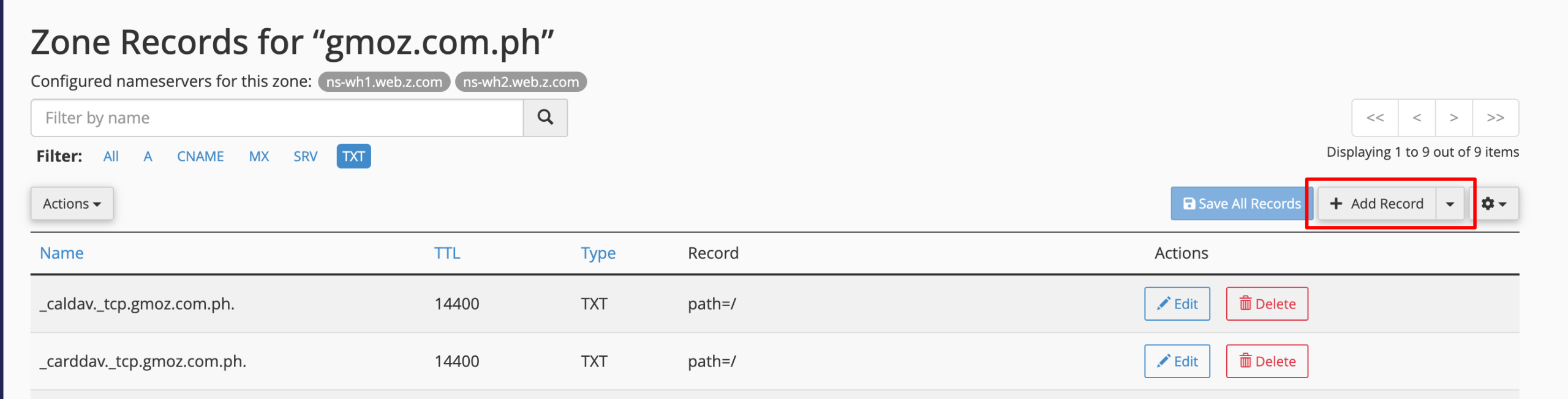
default._domainkey.yourdomain.com. Find your DKIM chunks on step#3, paste the first chunk value into the first box, then click + Add TXT string to record and paste the second chunk value, click Save Record to save.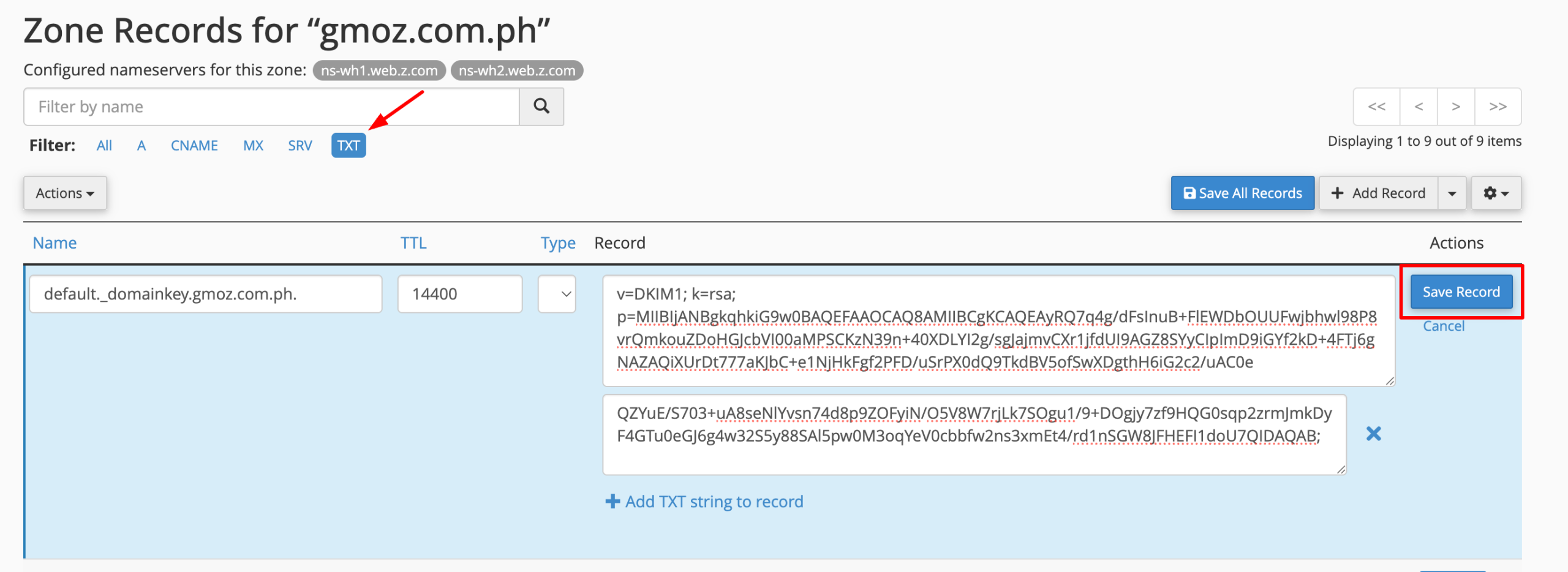
<
default._domainkey.yourdomain.com.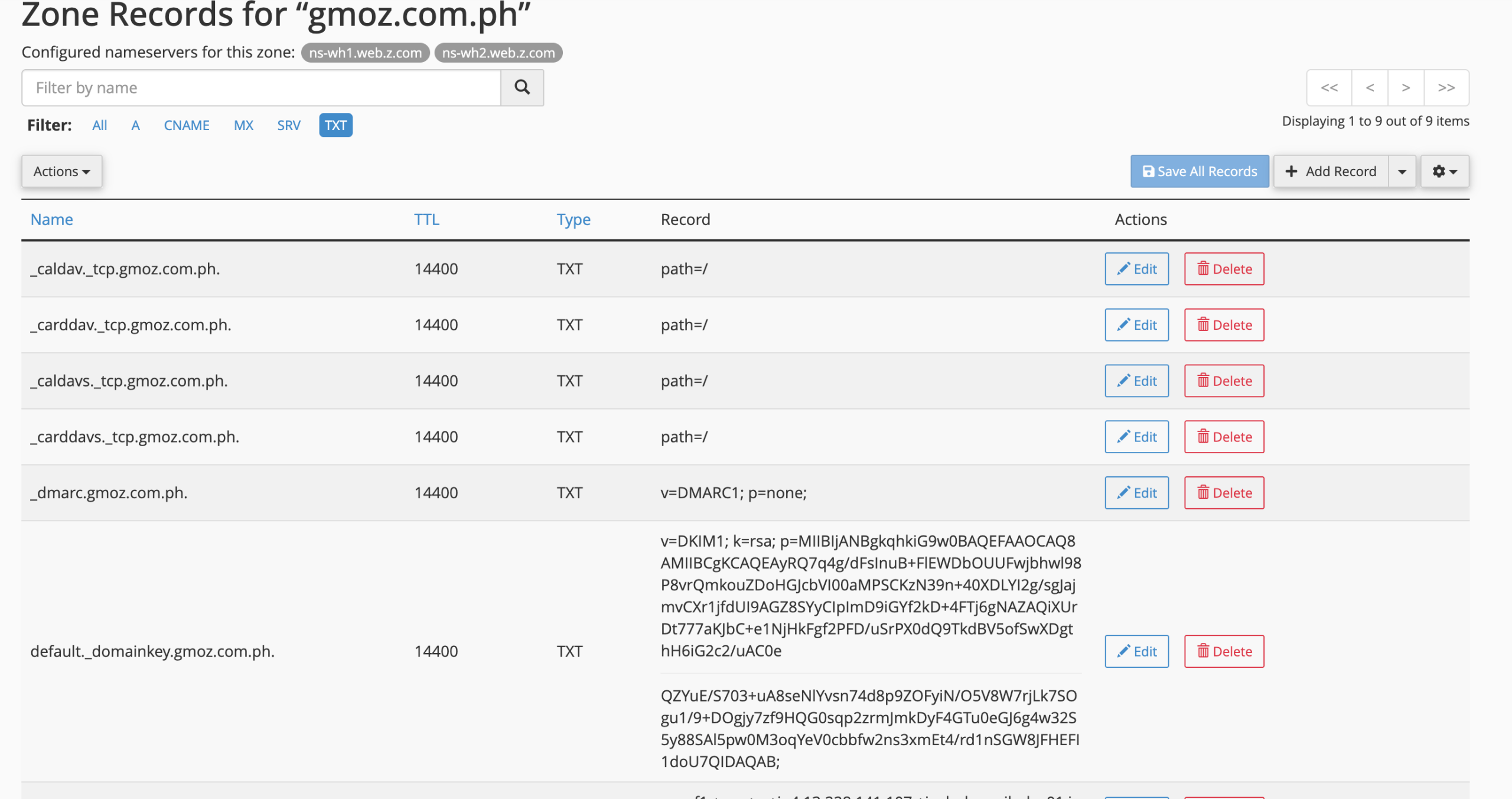
5. Save and wait for propagation
DNS changes typically propagate within a few minutes to an hour, though it can occasionally take up to 24–48 hours depending on TTL and caching.
Why DKIM records hit the 255-character limit
DKIM (DomainKeys Identified Mail) works by publishing a public key in a DNS TXT record. Receiving mail servers use that key to verify a digital signature attached to your outgoing email, confirming the message wasn’t altered in transit and really came from your domain.
The problem is a mismatch between two unrelated standards:
• DNS TXT records are governed by RFC 1035, which caps every individual character-string inside a TXT record at 255 octets. That’s a fixed protocol-level limit, not a setting any provider can change.
• DKIM public keys get longer as encryption gets stronger. A 1024-bit key produces a base64 string of roughly 210–220 characters, which usually fits. A 2048-bit key is the standard most mailbox providers now recommend and produces a string of roughly 390–450 characters once you add the required v=DKIM1; k=rsa; p= tags.
So a stronger, more secure DKIM key is exactly what pushes the record past the point where it fits in a single TXT string.
How to recognize the problem
You’re hitting this issue if any of the following happen when you try to save the DKIM record in your DNS control panel:
• An error like ‘invalid record data’, ‘value too long’, or ‘TXT record exceeds maximum length’
• The field simply truncates what you paste, cutting the key short
• DKIM later fails validation because only part of the key was saved
The splitting rule in one sentence
Break the DKIM value into consecutive chunks of 255 characters or fewer, wrap each chunk in its own set of double quotation marks, and publish them as one single TXT record not as multiple separate records.
When a resolver reads a multi-string TXT record, it concatenates the strings back together in order before handing the value to whatever application requested it (in this case, DKIM validation). So splitting doesn’t change the key at all it only changes how it’s transmitted and stored.
NOTE:
If you’re not using Z.com DNS and your current DNS provider do not support multi-string TXT record, you have option to:
Use a 1024-bit DKIM key instead of 2048-bit. It’s short enough to fit in a single 255-character string. It’s less future-proof cryptographically, but still functional and widely supported, a reasonable short-term fix.
Manage your DNS service elsewhere.
Check with your DNS provider If you’d rather keep your DNS where it is currently hosted, ask your provider whether they support long TXT records through their own method.
Want your DNS handles this for you?
| Z.com’s Unlimited Email hosting include builtin DNS management to accept standard multi-string TXT records without the copy-paste guesswork — so adding long DKIM keys in Z.com platform became easy and simple. |
| Explore Z.com Email Hosting Plans |